Klondike Solitaire Card Game
- 4.9
- Rating
- 500.00K
- Installs
- Free
- Price
 Analysis by App-foxy
I spent time with Klondike Solitaire Card Game as a quiet, familiar card game rather than a flashy challenge. Its appeal is easy to understand: it keeps the focus on Klondike solitaire, uses large cards, and feels suited to adults and older players who want a straightforward way to play. I found it most comfortable in short sessions, especially when I wanted something relaxing that did not require learning a complicated rule set.
This is a free card game from FelicityGames, with optional in-app purchases ranging from $0.49 to $99.99 per item. It is rated for Everyone, runs on Android 10 or later, and has reached over 500 thousand installs. Those details make it approachable for a wide audience, but the real question is whether the presentation and interaction feel usable for different abilities and everyday situations. In my experience, the large-card approach helps considerably, although it does not remove every possible barrier.
How the table feels to read and navigate
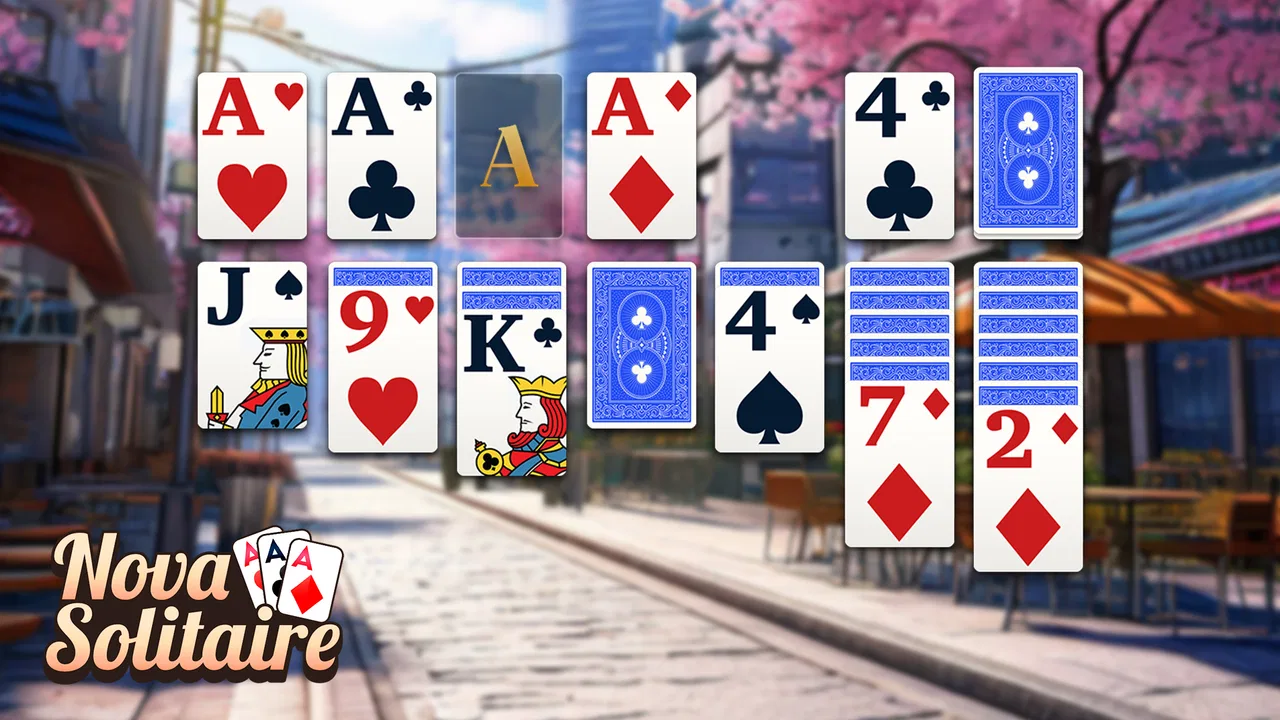
The strongest part of the experience is the visual priority given to the cards. In a solitaire game, the tableau can become difficult to follow when cards are small or crowded, so the emphasis on big cards is more than a cosmetic choice. I could identify the suits and values without feeling that I had to lean into the screen, which is useful for anyone with reduced visual sharpness or simply tired eyes.
You May Also Like

 Blood Strike: 2.5 Anniversary
Blood Strike’s Loadouts Turn Every Drop Into a Tactical Gamble
A close look at Blood Strike’s custom loadouts: how fast access to signature weapons reshapes its battle royale rhythm, rewards preparation, and narrows the gap between fights.

 Pandora - Music & Podcasts
Pandora’s Music Is Easy to Start, but Harder to Recover
Pandora’s strength is its low-effort path from a seed to a station. Its weak spot is how much confidence it asks you to place in connection, setup, and quiet recovery.

 8 Ball Pool
 Is Built on Rivalries, Rematches, and Routine
A close look at the rivalries, rematches, shared routines, and unanswered safety questions that turn a quick pool match into a persistent mobile community.

 Samsung Music
’s Quiet Strength Is Playing What You Already Own
Its reach comes less from spectacle than from dependable access to a personal library. That simplicity is both the app’s strongest retention engine and its ceiling.

 AccuWeather: Weather Radar
AccuWeather Review: A Quick, Clear Forecast for Everyday Decisions
For everyday plans, the best forecast is the one you can understand quickly. AccuWeather makes rain timing, radar, and local conditions easy to act on, with a few trade-offs.

 Hill Climb Racing
Why Hill Climb Racing Still Turns Crashes Into One More Run
A tiny car, a bumpy hill and one more upgrade: Hill Climb Racing keeps resurfacing because its simple chaos makes every near-miss feel personal.
More From Our News Desk
View All News


That readability also helps new players. Klondike has familiar rules, but the changing columns can still be confusing when several cards overlap. Larger faces make it easier to see which card is exposed and which cards are hidden underneath. I found myself spending less effort decoding the layout and more effort deciding whether to build a sequence, open a column, or work through the stock.
The interface is at its best when I treat it as a calm, deliberate game. I can pause between moves and inspect the tableau instead of rushing. That matters for players who process visual information more slowly, for people returning to solitaire after a long break, and for anyone who prefers a low-pressure pace. The game does not need the constant attention demanded by an action title, so it is easier to play while taking a quiet break.
Navigation is also helped by the narrow scope of the game. I am not moving through a large map, managing a character, or learning several unrelated systems. The card table is the center of the experience. That simplicity reduces cognitive load, particularly for someone who wants a familiar pastime rather than a busy mobile interface.
Still, a large card does not automatically mean every control is equally easy to understand. Solitaire layouts contain several visual zones: the stock, waste pile, foundations, tableau columns, and sometimes surrounding controls. A first-time player may need a few rounds to understand where each action belongs. I recommend beginning with a slow game and deliberately checking the result of each move rather than tapping quickly through the layout.
One useful habit is to pause before moving a card from a long column. I found that this makes the next available move easier to spot and reduces accidental choices. It is a small adjustment, but it is especially helpful when the screen is being viewed in bright light or when the player is not fully focused.
The game’s public reception is very strong, with an average rating of 4.9 from around 21 thousand ratings. I would not treat that figure as proof that every player will find the interface perfect, but it does suggest that the basic presentation works well for many people. My own impression is that its clarity comes from restraint: it is trying to present a recognizable solitaire table, not turn the screen into a crowded dashboard.
Large cards help, but context still matters
Large cards are particularly valuable on a phone held at a normal reading distance. They can make a difference for older players who find small symbols tiring, or for someone playing without glasses for a few minutes. They also reduce the need to repeatedly zoom mentally into the tableau, which makes a short session feel less strenuous.
However, readability depends on more than card size. Glare, low brightness, a cracked screen, and a player’s own contrast sensitivity can all affect the experience. I found the game more comfortable when the phone was held steady and the surrounding light was not reflecting directly across the display. That is not a special feature of this title, but it is a practical part of using any card game on a phone.
Players who need very specific visual adjustments should approach it with realistic expectations. The large-card design is a meaningful advantage, yet it should not be confused with a complete accessibility toolkit. If your main requirement is extensive customization of text, contrast, color presentation, or input behavior, a platform-native card app with clearly documented accessibility controls may be a better fit.
Motor comfort and sensory demands during play
Klondike is naturally less demanding than games that require rapid reactions, repeated swipes, or precise timing. I can think through a move and make it without racing against an opponent. That makes this version a reasonable choice for players with limited dexterity, mild hand fatigue, or a preference for slower touch interaction.
The basic card-game rhythm also works well for one-handed moments. I could play while sitting on a sofa or during a quiet wait, although the exact comfort depends on the size of the phone and how stable the grip is. A larger handset gives the cards more room but may be harder to hold, while a smaller phone is easier to carry but can make the tableau feel tighter. The big-card presentation helps balance that trade-off without eliminating it.
For players with tremors or reduced touch precision, the main concern is not speed but placement. A card may need to be selected or moved in relation to several nearby piles, and a small unintended touch can disrupt the intended sequence. I found that using slower, more purposeful taps was safer than trying to move cards quickly. Holding the phone with both hands can also make the table easier to inspect and reduce accidental movement.
This is one of the less obvious strengths of a traditional solitaire format: the player controls the tempo. There is no need to prove dexterity through a timed sequence. Someone recovering from hand strain can play a few moves, stop, and return later without losing the entire value of the session. That makes it more flexible than many casual games that advertise simplicity but still depend on quick gestures.
At the same time, solitaire is not completely free of motor demands. Repeatedly moving cards through a long session can still tire a hand, especially on a phone held in one position. I would not recommend treating it as a hands-free activity or assuming that large cards solve every interaction issue. If tapping itself is painful, a game designed around external controls or voice interaction may be more suitable.
Sensory load is generally modest. The central activity is visual, and the pace is self-directed. I found it calmer than games built around constant animation, urgent notifications, or competitive pressure. That can suit players who become overwhelmed by busy screens or who want a predictable activity before bed, during a break, or while waiting for an appointment.
There is a trade-off here. Because the game is so focused on the card table, players who need strong nonvisual feedback may find it less comfortable than players who can easily read the screen. A person with limited vision may need another type of solitaire experience that offers more explicit spoken or tactile guidance. The large-card design improves visual access, but it does not turn the game into an audio-first tool.
A practical way to reduce mistakes
I found it useful to treat each turn as a small planning exercise instead of immediately moving the first available card. First I scan the tableau for face-up cards that can be placed on another column, then I check whether opening an empty space would expose a hidden card, and only after that do I work through the stock. This order is not a special mode or hidden system; it is simply a more reliable workflow for this layout.
That approach has two benefits for accessibility. It reduces rushed gestures, and it limits the number of visual elements I am comparing at once. Players who find a full tableau overwhelming may benefit from focusing on one column at a time. It also makes the game more enjoyable for beginners because a lost round feels like a planning lesson rather than a series of unexplained mistakes.
Where it fits into real life
The game works particularly well in situations where I have a few uninterrupted minutes but do not want to commit to a long story or multiplayer match. I can imagine using it during a train journey, in a waiting room, or after lunch when I want a mental reset. Since the game is familiar, I do not need to spend the first part of the break learning a new system.
A realistic everyday scenario would be an older family member using a phone in the afternoon for a short, independent activity. The large cards can make the table easier to see, and the traditional rules make it possible to begin without a tutorial-heavy introduction. A relative could explain the basic Klondike goal once, then let the player develop a personal rhythm. That independence is valuable: the game can be relaxing without requiring someone else to manage it.
I also see a use for people who want a gentle way to occupy their hands while listening to a podcast or sitting through a routine wait. The game is not demanding enough to dominate every moment, although I would avoid playing while walking, crossing roads, or doing anything that requires full attention. Its low-pressure nature makes it suitable for pauses, not for multitasking in situations where divided attention could be unsafe.
For someone who has never played Klondike, the best starting point is to focus on uncovering hidden cards rather than simply building the foundations as fast as possible. Moving a low card to a foundation may look productive, but opening a tableau column can create more options. This is the kind of practical lesson that becomes clear through repeated play, and the uncluttered format gives the player room to learn it.
The game can also suit people who dislike social competition. There is no need to compare performance with another person to enjoy a round. I can play for the satisfaction of organizing the table, solving a difficult position, or simply passing time. That makes it a better match for private relaxation than for players seeking live opponents, chat, or a strong competitive ladder.
On the other hand, players who want a broad collection of card games may find the focus narrow. The short description identifies it as Klondike Solitaire, and that specialization is both its identity and its limitation. If you want freecell, spider, hearts, or a large variety of rule sets in one installation, a wider card-game collection would offer more variety. This title is better for someone who already knows what kind of solitaire they want.
What the free model means for different players
The game can be installed and played without an upfront purchase, which lowers the barrier for someone who is only curious about this style of solitaire. That is useful when recommending it to a family member who does not want to pay before seeing whether the card size and interaction feel comfortable.
There are optional purchases, with individual items priced from $0.49 to $99.99. That wide range is worth keeping in mind before handing the phone to a child or to someone who may tap purchase prompts without fully understanding them. The Everyone rating describes the content, not a guarantee that every spending decision will be effortless. I would personally review purchase controls on the device before letting another person use the game independently.
For adults and seniors, the free entry point is convenient, but the presence of in-app purchases means the financial side deserves the same attention as the visual side. A player who wants a completely purchase-free experience should compare it with a paid solitaire app or a version whose business model is clearer to them. The right choice depends on whether convenience or strict spending simplicity matters more.
The developer is FelicityGames, and the current version is 3.14.3. I mention the version because it is useful when checking compatibility or discussing the app with someone else, especially if two phones appear to behave differently. It supports Android 10 and newer, so owners of older devices should check their operating system before planning around it.
That Android requirement is not an issue for a recent phone, but it can matter for an older handset kept as a spare or passed down to a parent. In that situation, compatibility should be checked first rather than assuming that every Android phone can run it. This is one reason I would test the game on the actual device the intended player will use, not only on the reviewer’s newer phone.
Remaining barriers and who should choose another game
The biggest remaining barrier is that large cards address only one part of access. A player may still struggle with touch accuracy, color recognition, screen glare, or the need for spoken guidance. I would describe the game as visually considerate, not universally accessible. That distinction matters when recommending it to someone with a specific disability or a strong need for assistive technology.
Color-dependent card recognition may also be uncomfortable for some players. Traditional solitaire relies on distinguishing suits and alternating colors, so anyone who has difficulty separating red and black symbols may need to inspect cards more carefully. The familiar design remains understandable, but it may not be equally effortless for every form of color-vision difference.
Another limitation is the concentration required to track a changing tableau. Even though the game is slow, it still asks the player to remember which cards are hidden, which columns are blocked, and which moves might open space. Someone looking for a purely passive distraction may prefer a simple visual toy or an audio activity instead. This is a thinking game, just a gentle one.
I would also steer away from it if your priority is social play, deep customization, or a large competitive feature set. A dedicated multiplayer card platform will be a better choice for live matches, while a more advanced solitaire application may suit players who want detailed statistics, alternate variants, or extensive presentation controls. The strength here is the focused Klondike experience, not breadth.
There is a subtle trade-off between simplicity and guidance. A clean table is easier to understand than a crowded one, but players who need step-by-step assistance may want more explicit instruction than a traditional layout naturally provides. Beginners can learn through practice, yet someone who becomes frustrated by an unclear move may prefer an app built around tutorials and hints.
My advice is to give the game a short, deliberate trial rather than judging it after one rushed round. Use a comfortable screen position, enlarge the viewing distance only as far as the cards remain clear, and move slowly enough to see which card has become available. If the table feels readable and the touch interaction does not cause strain, the focused design is likely to work well. If those basics remain difficult, more specialized software is the sensible alternative.
A considerate solitaire choice with clear limits
After using it, I see Klondike Solitaire Card Game as a friendly option for people who want traditional solitaire presented in a visually approachable way. The big-card emphasis is genuinely useful for older adults, tired eyes, and players who dislike cramped mobile layouts. The self-paced structure also supports people who need time to plan or who want a quiet activity without competition and rapid reactions.
Its inclusive qualities are practical rather than comprehensive. It can reduce visual strain and make the familiar tableau easier to follow, but it does not solve every issue involving touch precision, color distinction, or nonvisual play. I would recommend it confidently to a friend who wants straightforward Klondike on a compatible Android phone, while being more careful when recommending it to someone who needs specialized accessibility controls.
The free starting point makes that recommendation easy, provided the player or caregiver is comfortable with optional purchases. I also like that the game does not demand a large time commitment: a single round can fill a short pause, while a difficult layout can invite a longer session when the player has more patience.
For me, the deciding question is not whether it contains every feature found in modern card apps. It does not need to. The better question is whether its large, familiar card table makes solitaire easier to approach and easier to enjoy. In that role, it succeeds. If you value readable cards, a calm pace, and a focused Klondike experience, this is a sensible game to try; if you need extensive accessibility customization or broad multiplayer variety, look elsewhere.
FAQs for Klondike Solitaire Card Game
01What are the system requirements for Klondike Solitaire Card Game?
Klondike Solitaire Card Game is designed to run smoothly on both Android and iOS devices. For Android, it typically requires version 4.1 or higher, and for iOS, version 9.0 or later is recommended. Ensure your device has sufficient storage space, as the app may require additional data for features and updates.
02Is Klondike Solitaire Card Game free to play?
Yes, Klondike Solitaire Card Game is free to download and play. However, it may include optional in-app purchases for extra features, such as ad removal or additional card themes. These purchases enhance the gaming experience but are not necessary to enjoy the core gameplay.
03Can I play Klondike Solitaire offline?
Absolutely! Klondike Solitaire Card Game is fully functional offline, allowing you to play without an internet connection. This makes it perfect for on-the-go gaming, whether you’re commuting or traveling without access to Wi-Fi or data services.
04Does Klondike Solitaire offer customization options?
Yes, the game provides various customization options, including different card backs, backgrounds, and themes. These can be accessed through the settings menu, allowing you to personalize your gameplay experience. Some themes may require in-app purchases, while others are available for free.
05Is there a way to track my progress or statistics in the game?
Klondike Solitaire Card Game includes a comprehensive statistics tracker that records your wins, losses, and best times. This feature helps you monitor your progress and improve your skills over time. You can access these statistics from the main menu, providing insights into your gameplay patterns.
Pros
- Intuitive interface for easy navigation.
- Offline play available
- no internet needed.
- Customizable card designs and backgrounds.
- Daily challenges with rewarding bonuses.
- Smooth animations enhance gameplay experience.
Cons
- Contains ads that may disrupt play.
- Limited hints in free version.
- No multiplayer mode available.
- In-app purchases can be pricey.
- Occasional minor bugs in updates.

Klondike Solitaire Card Game
Gallery